What Is the AI Zombie Trend? The Love Story Match Cut Explained
A short guide to the visual story: a frightening reunion gives way to a familiar embrace, and that embrace carries the viewer into a happier time.
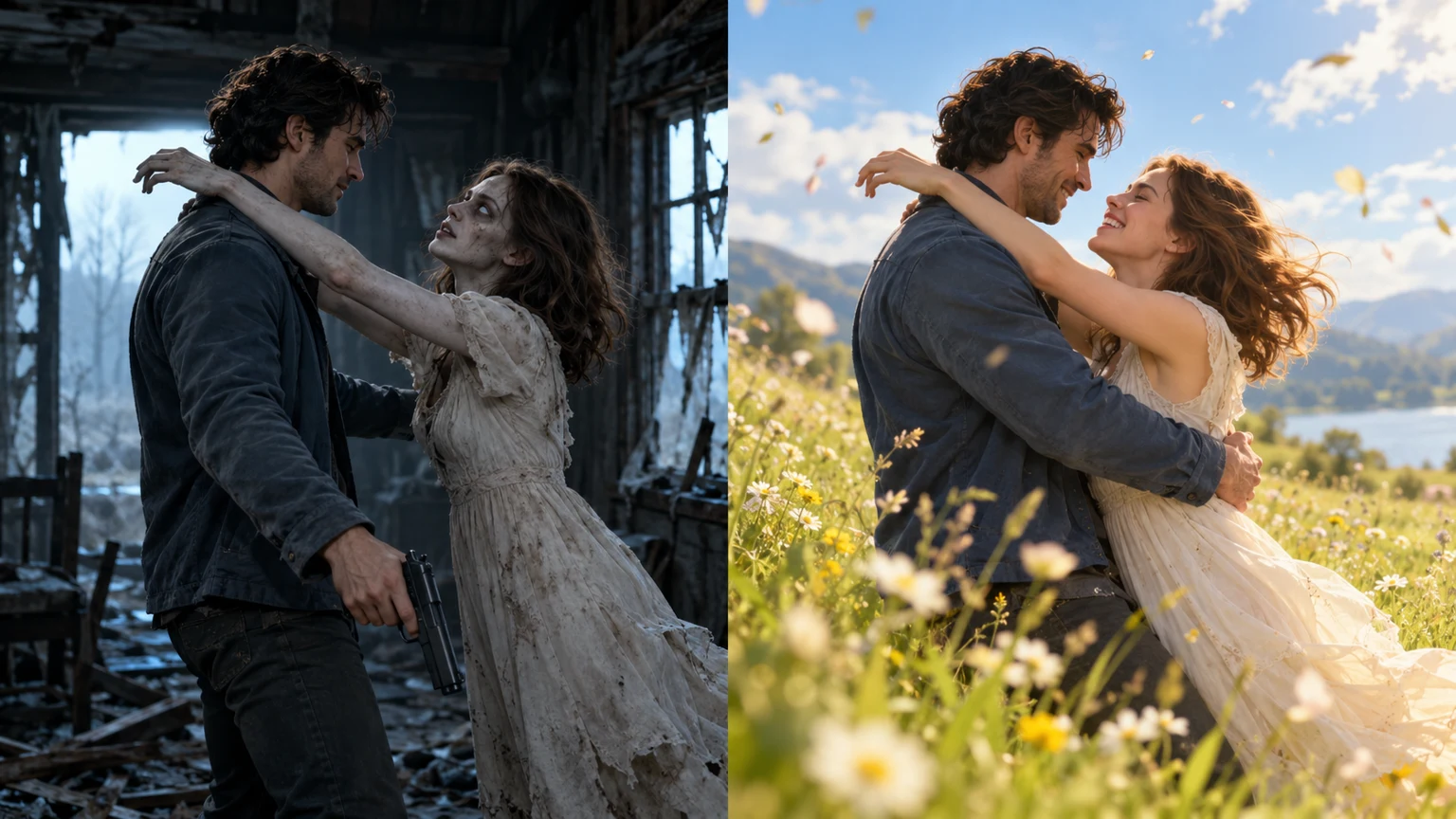
In this version of the zombie video format, the emotional change happens before the setting changes. A survivor recognizes someone they love, decides to welcome them, and reaches out. The film then follows the same movement into a bright memory. The setting is fictional; your two portraits supply the recurring identities.
The four moments that tell the story
Begin in a damaged cabin with enough of both characters visible to establish their positions. The person from the first photo is the survivor. The second portrait belongs to the infected partner. A restrained change in complexion can communicate the infection while leaving the face recognizable.
The survivor lowers the weapon and makes space for an embrace. Give that decision a readable pause. A viewer should be able to understand the change through posture and expression, even with the sound turned off.
The partner moves forward and their arms connect. Cut from that shared pose into a meadow, where the healthy couple continue the hug and fall into the grass. Keep their movement flowing across the change of scene.
Why the match cut matters
A successful match cut gives the eye something consistent to follow. Here it is the position of the two bodies and the direction of their motion. The viewer sees one gesture continuing while the environment and the emotional meaning change around it.
Compare the frames on either side of the edit. Keep the survivor on the same side, preserve the camera height, and check that hands stay near the same shoulders. A cut between incompatible poses will feel like a restart rather than a continuation.
A memory rather than an on-screen cure
The sunny scene works as a recollection of the relationship. Treat it as another time and place: warm light, healthy faces and ordinary affection. The contrast is stronger when the film leaves the dark room decisively.
Avoid a gradual transformation of the infected face inside the cabin if your intention is a memory. That visual cue suggests a cure. A clean change of location makes the story easier to read.
What the available references establish
Other tools publish their own interpretations, lengths and templates. These examples show how the visual idea is used; they do not identify a single originator or establish how popular a format is. Read each product description before comparing its output with this generator. Seadanse’s zombie match cut page imageat’s Choice story
Make your own version
Prepare two individual adult portraits, check their assigned roles, and choose a frame. Our couple workflow requests a 25-second 720P video, with a 10-second opening and a 15-second memory in its storyboard. AI timing, identity and movement can vary, so inspect the result before sharing. generator
The linked tutorial explains the complete prompt and photo preparation. The pricing page describes the single purchase. You can read the guide and watch the example before placing an order. Zombie Apocalypse AI Video Editing Prompt one-time pricing
Related zombie video editing guides
Continue with the full Reels workflow or a focused guide to the story, prompt or reference photos.
- Zombie AI Video Editing Prompt
Copy the full zombie AI video editing prompt, upload two photos and make a 25-second story. Learn how to fix the match cut, references and natural audio.
- Zombie Love Story Reels Editing
Create on the page, copy the complete prompt and finish the embrace-to-memory edit.
- Zombie Match Cut Prompt: From Apocalypse to a Happy Memory
Plan a zombie love story prompt with clear character roles, a 25-second story and a pose-matched cut into grass or snow.
- How to Choose Photos for an AI Zombie Love Story
Choose clear portraits for the human and zombie partner, keep identities consistent through the memory scene, and check the finished AI video.