 Zombie Couple Video
Input · two photos
One adult per image. JPG, PNG or WebP, up to 10 MB each. Use a clear, front-facing photo with permission from the person pictured.
Create a zombie love story from two photos: a tense encounter, an embrace, and a sunny memory. Upload your portraits to make a video for Reels, TikTok or Shorts.
Photo 1 stays human. Photo 2 becomes the zombie. Upload both, choose a format, then pay once. No account or subscription required.
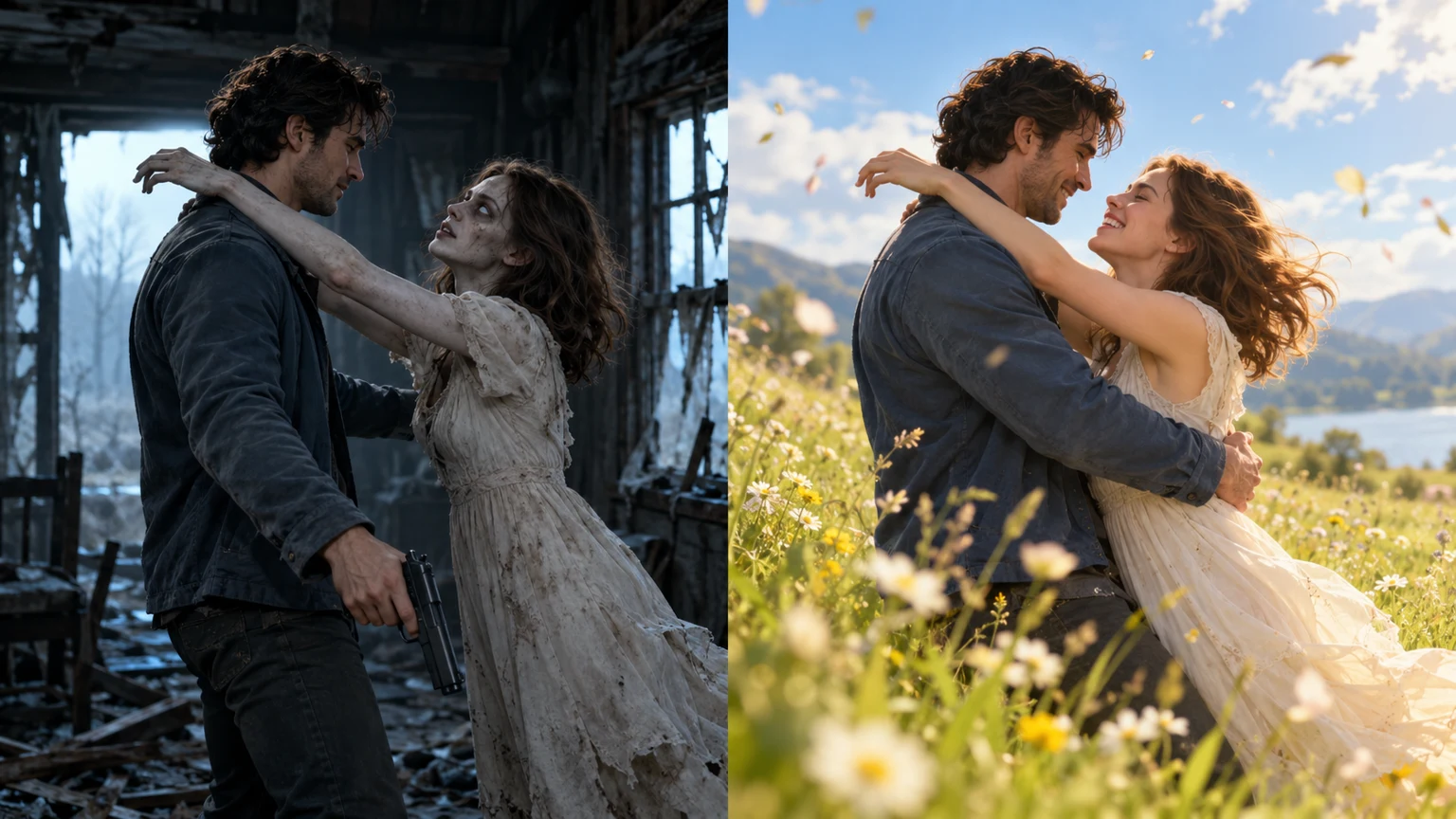
Watch the sample story before creating yours. AI-generated example; your faces, movement and transition may differ. The downloaded video includes natural scene audio; playback starts muted.
Check the input, output and delivery details before purchasing.
One adult per image. JPG, PNG or WebP, up to 10 MB each. Use a clear, front-facing photo with permission from the person pictured.
A 720P zombie love story in 9:16 portrait or 16:9 landscape, with natural scene audio. Add your own music or captions after downloading.
One payment per video, with no subscription or account required. Processing time depends on the generation queue; track your existing order for updates.
Add an optional delivery email or use My orders on this device to follow progress on your private order page. Preview and download the finished video within the 14-day media retention window.
The built-in story follows three moments, from a tense encounter to a bright memory.
Inside a ruined cabin, he faces the woman he loves after she has become a zombie.
He lowers the gun and opens his arms. She rushes toward him.
At contact, the same hug continues in a sunny meadow. She is human again; they fall together and laugh.
No prompt writing or editing is needed to generate the built-in story.
Photo 1 is the human partner; photo 2 becomes the zombie and returns as their healthy self in the memory.
Pick 9:16 for Reels and Shorts or 16:9 for landscape.
Pay $4.99 once. Follow progress on your private order page, then preview and download your video.
Create one 25-second 720P couple story for $4.99. Choose portrait or landscape at the same price.
One-time $4.99 payment. No subscription or account required. The story prompt targets the match cut at the embrace; AI timing and likeness can vary.
The tool above creates the built-in cabin-to-meadow story from two photos. If you want to work with a different video model, plan a snowy memory, or add music and captions yourself, start with the free guides below. The prompt explains the character roles, camera direction and embrace-to-memory cut; the Reels guide covers the finishing edit after generation.
Scene-by-scene planning, a full prompt copy link and a Reels editing checklist.
Get the complete story instructions and compare the Google Flow workflow.
Upload two photos directly to create the couple’s memory story.
Understand the choice, leap and embrace-to-memory transition.
An AI zombie video turns reference photos into a fictional encounter with a loved one who has become infected. In the love story version, the survivor recognizes their partner, lowers a weapon without firing and opens their arms. The infected partner moves into an embrace, and the scene cuts to an earlier, happier moment. The emotional change comes from remembering the person behind the zombie appearance. This is the story sometimes called the zombie love story, AI zombie hug or AI zombie trend.
The current video is 25 seconds at 720P. Its opening is planned as a 10-second encounter in an abandoned house, followed by a 15-second memory in a golden mountain meadow. Those numbers describe the storyboard and export settings rather than a promise that an AI model will cut on an exact frame. The central action is the same: the survivor opens their arms, the partner leaps toward them, and contact connects the present to the past.
This AI Zombie Video Generator uses two portraits as identity references while its built-in prompt supplies the action, camera instructions and lighting. It generates a moving story rather than a still zombie portrait. You do not need a zombie makeup photo, a written script or separate clips to assemble. The current couple version uses the ruined cabin and sunlit meadow; the interface lets you choose the photos and frame, while separate prompt guides explain other settings for manual workflows.
Start with two separate portraits showing one adult in each image. Keep the face large enough to see the eyes, hairline and expression, with even lighting and little obstruction. The file picker accepts JPG, PNG and WebP, up to 10 MB per photo. A group photo gives the model several competing faces, while sunglasses, heavy filters and deep shadows remove details it needs to recognize the intended character.
Upload order matters more than gender. Check the labels before selecting a file: photo 1 is the human partner and photo 2 becomes the zombie. If you swap the images, you also swap the roles. Both references are used again in the happy memory, so choose images you are comfortable seeing in both scenes. Use pictures you own or have permission to use; a clearer reference helps continuity but does not guarantee an exact likeness.
Portrait 9:16 is a practical starting point for Instagram Reels, TikTok and YouTube Shorts. It keeps the couple close together in a tall frame and gives you room to add a short caption in your own editor. Landscape 16:9 leaves more horizontal space around the leap and meadow. Both selections use the same story, 25-second duration and 720P output; changing the frame does not change the one-time price.
The generated track uses natural scene audio rather than a background song. The present calls for breathing, footsteps and room ambience; the memory moves toward laughter, grass rustling and outdoor sounds. Listen to the delivered file before adding your own music, because sound and action may differ from the plan. A caption or music track can be added after downloading with your preferred editor. Neither is a selector in this tool.
Choose your two images and format directly in the tool at the top of this page. The next step offers an optional delivery email before taking you to the one-time $4.99 payment. Your private order page then shows progress and provides a preview and download when processing finishes. No account or subscription is required. During busy periods, return to the existing order rather than creating another purchase while the first generation is still in progress.
Review the output at the transition: are both faces recognizable, do the arms stay in a connected pose, and does the leap continue in the same screen direction? Then check the brighter memory for unwanted zombie styling and listen for abrupt audio changes. The delivered media is retained for 14 days, so download a local copy during that period. The private link grants access to the order and should be kept with your purchase confirmation.
The contrast between the abandoned house and the meadow works because the embrace gives the viewer a recognizable action on both sides. A slow fade between unrelated poses tells the story differently. This tool asks for one decisive scene change at contact, with the partner healthy in the memory. When reviewing a result, compare the couple’s position and movement across that moment before judging the beauty of each individual shot.
An editing reference for the visual connection between shots; it explains the technique used to plan this story.
The pet version uses your portrait and one cat or dog photo for a 15-second vertical 720P story. An infected pet attacks, the owner opens their arms, and the same jump continues as a loving memory in a golden meadow. Open a pet tool below for the two-photo generator and the full workflow.
It is a photo-to-video tool that casts your uploaded portraits in a fictional zombie story. This generator creates a couple’s encounter in a ruined cabin, an embrace and a transition to a sunny memory. The story is built in, so you do not need to write a prompt.
Video generation costs $4.99 per video as a one-time purchase. There is no subscription or account requirement. You can watch the sample and read the editing prompt for free; reading a prompt does not include a free generated video.
Yes, use the dedicated pet generator for an owner-and-pet story. It takes an adult owner portrait and a dog or cat photo, and requests a 15-second 720P vertical video. The couple tool above uses two adult portraits and a 25-second story.
The couple story includes natural scene audio, such as footsteps, breathing and outdoor ambience. It does not include background music. After downloading, you can add a song or captions with your preferred video editor.
A failed generation triggers a full refund to the original payment method. Track the refund status on your private order page. If the status says review is needed, contact support with your order number rather than purchasing again.
AI zombie love story reels editing combines two-photo generation with a finishing pass for the embrace-to-memory video. It covers the scene sequence, match cut, sound and captions.
The tutorial provides a free one-click copy button and complete text link, plus photo preparation and optional Google Flow steps.
This version is a romantic zombie story: a human lowers a gun, opens their arms to an infected partner, and the embrace match cuts into a happy memory.
The cut connects the same body pose and movement across two scenes. A threatening lunge in the apocalypse continues as a loving hug in daylight.
The generator requests one 25-second 720P video: 10 seconds in the apocalypse, then 15 seconds in a happy memory. AI shot timing can vary.
One video costs $4.99 as a one-time purchase. No subscription or automatic renewal.
The person in photo 2 is the infected partner. Photo 1 is the human who lowers the gun and opens their arms. These roles follow upload order.
The current built-in story uses a sunny grass meadow. The guide explains a snowy-memory variation; this interface does not offer a location selector.
The story prompt requests a non-graphic zombie appearance, with no blood, bite or injury. The emotional focus is the embrace and memory.
AI can change facial details, hands and timing. The prompt guides the story and match cut, but exact likeness and frame-perfect continuity are not guaranteed.
Processing depends on provider capacity and queue length. Follow the status on your private order page; there is no guaranteed delivery time.
Open the editing prompt guide to copy the complete text, learn how its reference and action instructions work, and troubleshoot the match cut.
Choose the story you want to make, then use a focused guide to plan the photos, prompt or edit. Each tool opens with its own generator; the tutorials explain the decisions behind the result.
Copy the full prompt, understand its instructions and troubleshoot your edit.
Create a couple’s apocalypse-to-memory love story.
Follow the full editing process and copy the original prompt.
Focus on pose, momentum and the cut at the embrace.
Cast yourself and your dog in a remembered reunion.
Explore the story concept and recreation workflow.
Read the story prompt and editing tutorial.
Understand the choice, embrace and happy-memory ending.
Plan character references and movement continuity.
Choose clearer portraits for both recurring characters.
Review the one-time price and delivery details.
Browse the guides together before choosing a workflow.
Read the terms before purchasing, learn how uploaded media is handled, or contact support about an existing order. These pages explain the policies that apply to every generator.
Upload two portraits and create a 25-second story with the AI Zombie Video Generator.