Zombie Match Cut Prompt: From Apocalypse to a Happy Memory
Write a scene plan that makes the identities, action and connecting pose clear before asking a model to change the setting.
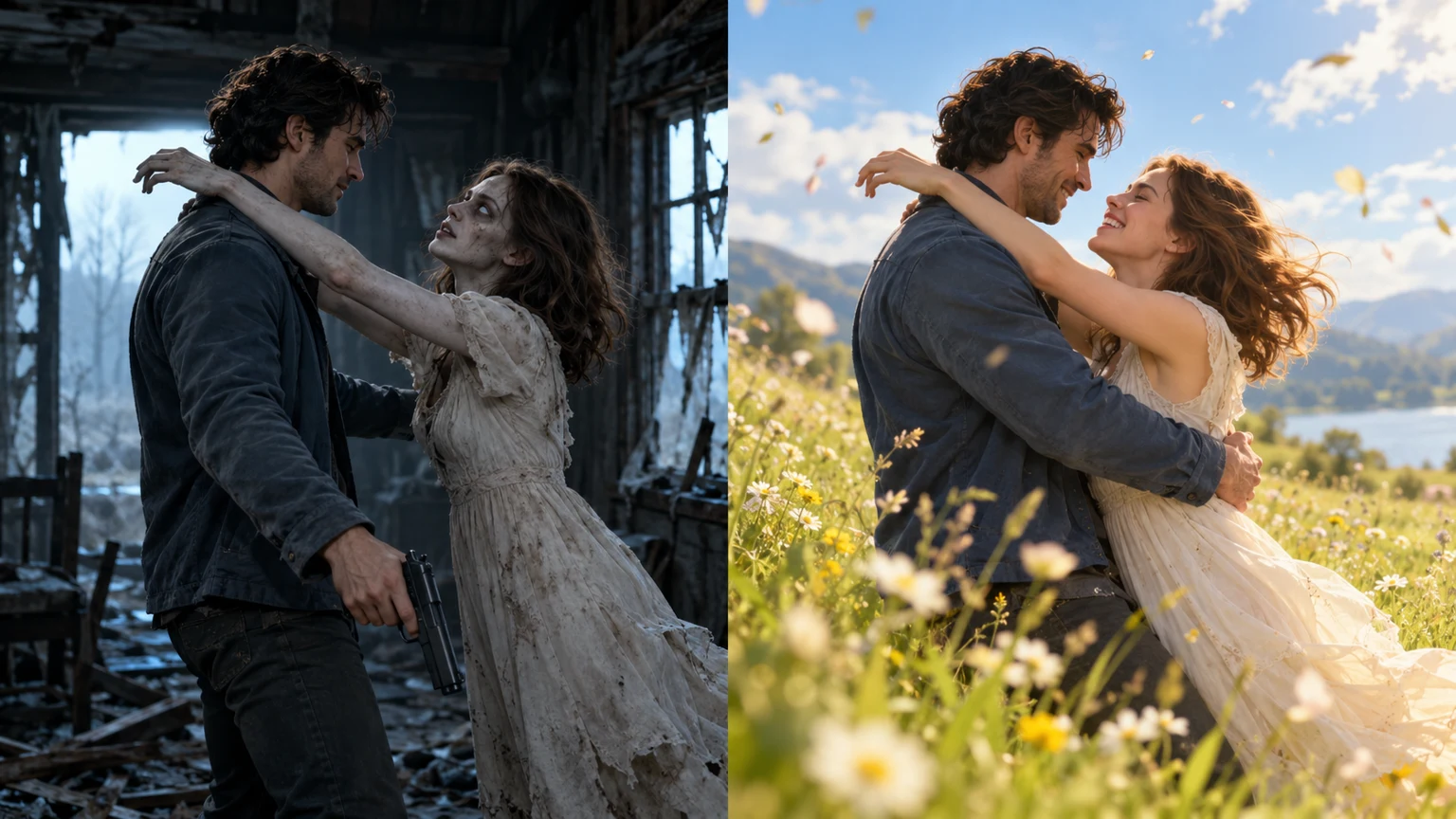
A useful instruction answers three questions: who appears in each role, what the people do, and what should stay consistent when the scene changes. Atmospheric words alone leave those decisions to the model. Give the action a clear order, then add the lighting and camera directions.
Start with two identity references
Refer to the first portrait as Image 1 and the second as Image 2. The first person remains human. The second person appears infected in the opening and healthy in the memory. Reuse the same references for both scenes so the model has a consistent identity guide.
Give the action room to breathe
Let the opening establish recognition before introducing fast movement. The survivor notices their partner, lowers the weapon and opens their arms. Only then does the partner move into the hug. Keeping those actions separate gives each moment a readable purpose.
The couple workflow requests a 10-second opening followed by a 15-second memory. These are generation and assembly targets rather than a promise about the exact timing of every gesture. Review the join and the faces in the delivered file.
A reusable story prompt
Use the two adult portraits as identity references. In a dim abandoned cabin, the survivor recognizes an infected loved one and lowers a weapon without firing. Both reach into an embrace. Continue the same connected pose in a sunny meadow, with the healthy couple leaning into the grass and laughing. Maintain their screen positions, camera height and direction of movement. Use breathing, footsteps and outdoor ambience, without background music, captions or graphic injury.
This planning example can help you describe the scene to a compatible video model. Its effect depends on the model, reference images and generation settings; it is not a guarantee of an identical result.
A snowy-memory variation
For an independent snow variation, place the memory on a bright snowy hillside and describe a gentle landing in soft snow. Change the environment while keeping the people and the connecting motion consistent.
The generator on this website uses the meadow story. It has a frame selector, but no environment selector. A snow setting belongs to a separate custom prompt workflow. web generator
If the transition looks wrong
Inspect the cut with the sound off first. Check screen direction, shoulder and hand positions, face visibility and the point of contact. Then listen for an abrupt audio change or an unwanted musical track.
A manual editor may be able to trim the clips around a closer pair of poses. For more precise continuity, a separate workflow can use a chosen embrace frame to guide the next scene. The built-in tool does not expose a frame-editing interface.
Follow the linked tutorial for the full preparation and editing sequence. The photo guide covers reference selection, and the trend guide explains why the bright scene is read as a memory. Zombie Apocalypse AI Video Editing Prompt tutorial trend explanation photo guide
Related zombie video editing guides
Continue with the full Reels workflow or a focused guide to the story, prompt or reference photos.
- Zombie AI Video Editing Prompt
Copy the full zombie AI video editing prompt, upload two photos and make a 25-second story. Learn how to fix the match cut, references and natural audio.
- Zombie Love Story Reels Editing
Create on the page, copy the complete prompt and finish the embrace-to-memory edit.
- What Is the AI Zombie Trend? The Love Story Match Cut Explained
Understand the zombie love story: a gun lowered, an embrace, and a match cut into a happy memory. A practical guide to the four story beats.
- How to Choose Photos for an AI Zombie Love Story
Choose clear portraits for the human and zombie partner, keep identities consistent through the memory scene, and check the finished AI video.